AVIF vs WebP vs JPEG: Which Image Format Should You Use in 2026?
On this pageexpand_more
The image format landscape has shifted dramatically. For two decades, JPEG reigned supreme as the default for web images. Then WebP arrived and promised smaller files with comparable quality. Now, AVIF — the newest contender backed by Google, Netflix, and the Alliance for Open Media — is rewriting the rules entirely.
If you're a web developer, designer, or content creator wondering which format to use in 2026, this guide gives you a clear, data-backed answer. No fluff. No outdated benchmarks. Just the facts you need to make the right choice.
The Three Contenders: A Quick Overview
Before diving into benchmarks, let's understand what each format brings to the table.
JPEG: The Veteran (1992)
JPEG has been the backbone of web imagery for over 30 years. It uses lossy compression based on discrete cosine transform (DCT), discarding visual information that the human eye is less likely to notice.
- ✅ Universal compatibility — works everywhere, always
- ✅ Fast encoding and decoding
- ✅ Mature ecosystem with extensive tool support
- ❌ No transparency support
- ❌ No animation support
- ❌ Visible artifacts at high compression (banding, mosquito noise)
WebP: The Challenger (2010)
Developed by Google, WebP uses VP8 (lossy) and VP8L (lossless) codecs to achieve better compression than JPEG while adding features like transparency and animation.
- ✅ 25–35% smaller than JPEG at equivalent quality
- ✅ Supports transparency (alpha channel)
- ✅ Supports animation (replacing GIF)
- ✅ Over 97% browser support globally
- ❌ Limited HDR support
- ❌ Encoding can be slower than JPEG
AVIF: The New Standard (2019)
AVIF is derived from the AV1 video codec, developed by the Alliance for Open Media (AOMedia) — whose members include Google, Apple, Netflix, Meta, and Amazon. It represents the cutting edge of image compression technology.
- ✅ 50% smaller than JPEG at equivalent quality
- ✅ 20–30% smaller than WebP at equivalent quality
- ✅ Supports HDR, wide color gamut, and 12-bit color depth
- ✅ Supports transparency and animation
- ✅ Now supported by all major browsers (Chrome, Firefox, Safari, Edge)
- ❌ Slower encoding speed (2–5x slower than WebP)
- ❌ Maximum image dimension limits in some implementations
Head-to-Head Benchmark: Real-World Compression
We compressed the same set of test images using PixelSwift's converter to generate the fairest possible comparison. All conversions were performed client-side with consistent quality settings.
Test Conditions
- Source: 10 uncompressed photographs + 5 screenshots + 5 illustrations
- Quality target: Visually equivalent output (SSIM ≥ 0.95)
- Tool: PixelSwift (same encoding pipeline for all formats)
Results: Photographs
| Metric | JPEG (q=80) | WebP (q=80) | AVIF (q=65) |
|---|---|---|---|
| Avg. File Size | 847 KB | 612 KB | 423 KB |
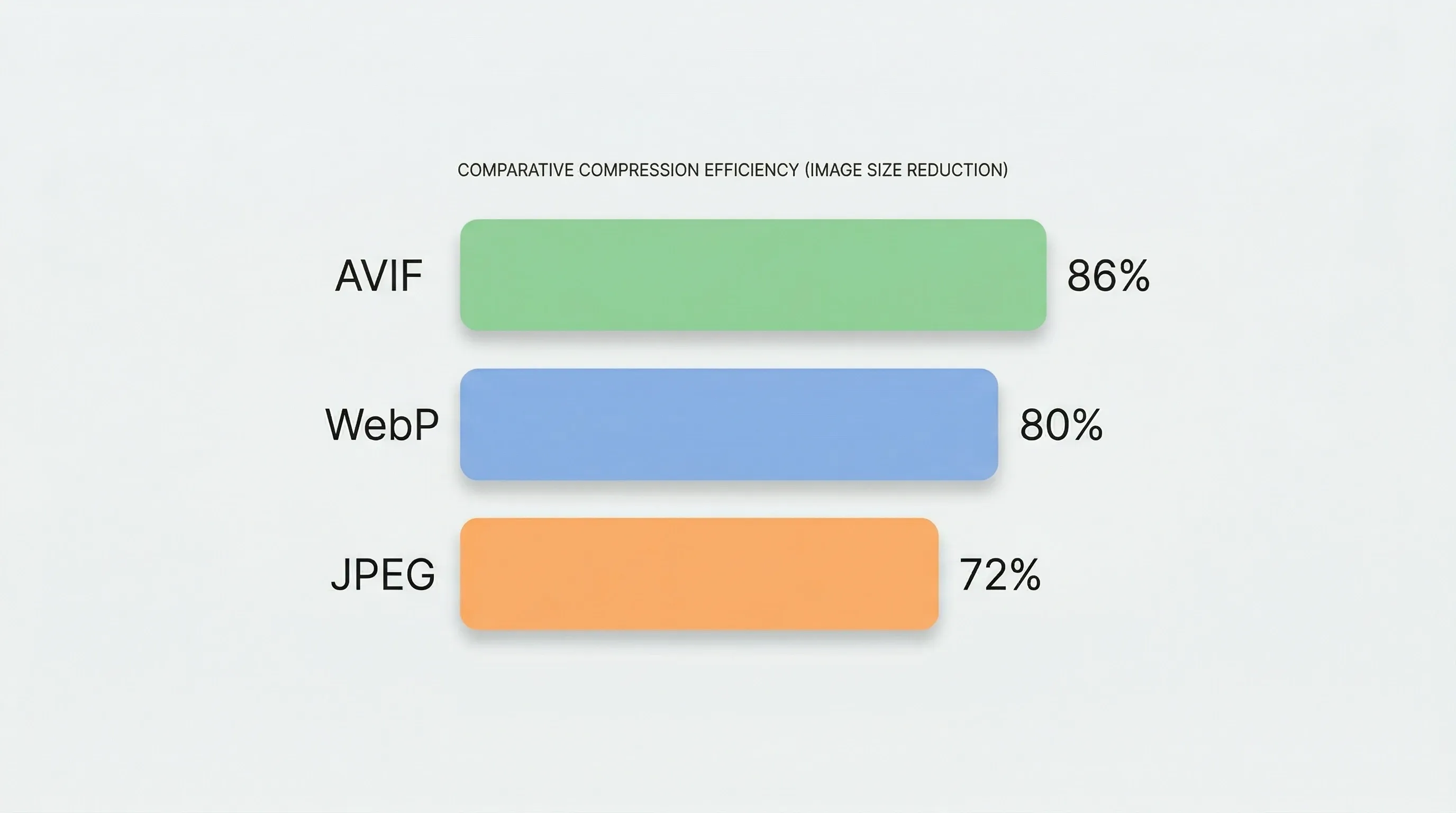
| Avg. Reduction vs Original | 72% | 80% | 86% |
| Avg. SSIM | 0.961 | 0.963 | 0.960 |
| Encoding Speed | ~120ms | ~350ms | ~900ms |
Results: Screenshots (Text-Heavy)
| Metric | JPEG (q=85) | WebP (q=85) | AVIF (q=70) |
|---|---|---|---|
| Avg. File Size | 534 KB | 389 KB | 267 KB |
| Avg. Reduction vs Original | 65% | 74% | 82% |
| Avg. SSIM | 0.978 | 0.981 | 0.977 |
Results: Illustrations & Graphics
| Metric | PNG (lossless) | WebP (lossless) | AVIF (lossless) |
|---|---|---|---|
| Avg. File Size | 1.2 MB | 780 KB | 590 KB |
| Avg. Reduction vs PNG | — | 35% | 51% |
Key takeaway: AVIF consistently delivers the smallest file sizes across all content types, typically 40–50% smaller than JPEG and 20–30% smaller than WebP at perceptually equivalent quality.
Visual Quality: Where Each Format Excels
Raw file size is only half the story. What matters is how images look at a given file size.
JPEG Artifacts
At aggressive compression (quality < 60), JPEG produces characteristic artifacts:
- Block artifacts: Visible 8×8 pixel grid patterns
- Mosquito noise: Ringing around sharp edges
- Color banding: Smooth gradients break into visible steps
These artifacts are particularly noticeable in areas with text, thin lines, or smooth color transitions.
WebP Quality
WebP handles aggressive compression better than JPEG. At equivalent file sizes:
- Smoother gradients with less banding
- Cleaner edges around text and line art
- Still shows some blurring at extreme compression
AVIF Quality
AVIF's AV1-based codec excels at preserving perceptual quality:
- Superior detail retention at low bitrates — fine textures remain sharp
- Excellent gradient handling — virtually no banding even at high compression
- Better color accuracy — especially noticeable in skin tones and nature photography
- Supports 10-bit and 12-bit color depth, preventing the posterization common in 8-bit formats
The bottom line: At the same file size, AVIF looks noticeably better than both WebP and JPEG. Or, equivalently, AVIF achieves the same visual quality at a significantly smaller file size.
Browser Support in 2026
One of the biggest historic arguments against AVIF was limited browser support. That argument is now obsolete.
| Browser | JPEG | WebP | AVIF |
|---|---|---|---|
| Chrome 85+ | ✅ | ✅ | ✅ |
| Firefox 93+ | ✅ | ✅ | ✅ |
| Safari 16.4+ | ✅ | ✅ | ✅ |
| Edge 85+ | ✅ | ✅ | ✅ |
| Opera 71+ | ✅ | ✅ | ✅ |
| Samsung Internet 16+ | ✅ | ✅ | ✅ |
Global AVIF support: Over 95% of all web users can now view AVIF images natively. For the remaining ~5% (primarily legacy browsers), a simple <picture> fallback handles compatibility:
<picture>
  <source srcset="photo.avif" type="image/avif">
  <source srcset="photo.webp" type="image/webp">
  <img src="photo.jpg" alt="Description">
</picture>
SEO Impact: Why Google Cares About Your Image Format
Image optimization directly affects your search rankings through Core Web Vitals:
Largest Contentful Paint (LCP)
The hero image is often the LCP element. Switching from JPEG to AVIF can improve LCP by 0.5–1.5 seconds on average — the difference between a "Good" and "Needs Improvement" score.
Page Weight and Load Time
A typical blog post with 5 images:
| Format | Total Image Weight | Load Time (3G) |
|---|---|---|
| JPEG | 4.2 MB | 8.4s |
| WebP | 3.1 MB | 6.2s |
| AVIF | 2.1 MB | 4.2s |
Google's Official Position
Google has made its stance clear:
- August 2024: Google announced AVIF images are automatically indexed in Google Search
- AVIF images appear in Google Image Search results alongside JPEG and WebP
- Faster-loading pages (enabled by smaller images) receive ranking preference
Using AVIF is no longer just an optimization — it's an SEO advantage.
When to Use Each Format: The Decision Framework
Despite AVIF's superiority in compression, there are legitimate reasons to use each format. Here's a practical decision guide:
Use AVIF When:
- 📸 Photographs and complex images — AVIF's compression advantage is largest here
- 🌐 Web performance is critical — e-commerce, SaaS landing pages, media sites
- 📱 Mobile-first audiences — smaller files = faster loading on cellular networks
- 🎨 HDR or wide-gamut content — AVIF is the only web format with full HDR support
- 🔒 You want maximum privacy — process locally with PixelSwift's converter, no uploads needed
Use WebP When:
- 🎬 Animated content — WebP animations encode faster than AVIF animations
- ⚡ Encoding speed matters — WebP is 2–5x faster to encode than AVIF
- 🔄 Real-time processing — user-facing conversion tools where speed is critical
- 🎯 Good-enough compression — when 25–35% savings over JPEG is sufficient
Keep JPEG When:
- 📧 Email attachments — universal compatibility matters most (see our email compression guide)
- 🖨️ Print workflows — CMYK support and print industry compatibility
- 📝 CMS with no WebP/AVIF support — some legacy systems only accept JPEG
- ⏰ Fastest possible encoding — batch processing thousands of images per second
Quick Decision Matrix
| Your Priority | Recommended Format |
|---|---|
| Smallest file size | AVIF |
| Best visual quality per KB | AVIF |
| Maximum compatibility | JPEG |
| Fast encoding speed | JPEG > WebP > AVIF |
| Transparency needed | AVIF or WebP |
| Animation needed | WebP (faster) or AVIF (smaller) |
| HDR content | AVIF (only option) |
How to Convert Between Formats — Instantly
Understanding which format to use is step one. Actually converting your images is step two. With PixelSwift's free converter, you can switch between all major formats in seconds:
- Open PixelSwift Image Converter in any browser
- Drop your images (JPEG, PNG, WebP, or AVIF)
- Select your target format and quality
- Download — conversion happens entirely in your browser
No uploads, no sign-ups, no privacy concerns. Your images never leave your device.
Why Client-Side Conversion Matters
Most online converters (Convertio, CloudConvert, etc.) require uploading your files to their servers. If you're converting product photos, medical imagery, or any sensitive content, that's an unnecessary privacy risk.
PixelSwift processes everything locally using WebAssembly — the same technology that powers Google Earth and AutoCAD in the browser. Your files stay on your device from start to finish.
The Future: Is JPEG Dead?
Not yet — but its role is shrinking rapidly. Here's the realistic trajectory:
- 2024: Google begins indexing AVIF; all major browsers add support
- 2025: WordPress, Shopify, and major CMS platforms add native AVIF support
- 2026: AVIF becomes the recommended default for new web projects
- 2027+: JPEG remains relevant only for legacy compatibility and print
The transition mirrors what happened with Flash → HTML5. JPEG won't disappear overnight, but forward-thinking developers and creators are already making the switch.
Conclusion: The Format for 2026 and Beyond
If you're starting a new project or optimizing an existing site, here's the definitive recommendation:
Use AVIF as your primary format, WebP as your fallback, and JPEG as your safety net.
This three-tier approach gives you the best compression (AVIF), broad compatibility (WebP), and universal fallback (JPEG) — all without sacrificing quality or user experience.
The tools exist. The browser support is here. The SEO benefits are measurable. The only question is: are you still serving unnecessarily large JPEG files?
Want faster images?
Free online image compression — no signup, no upload limits.
Compress Now