TinyPNG Alternative: A Truly Free & Unlimited Image Compressor
On this pageexpand_more
When it comes to online image compression, TinyPNG is usually the first tool that comes to mind. It's been the king of PNG/JPEG compression for over a decade, and the quality is genuinely excellent.
But if you've used it enough, you know TinyPNG comes with some frustrating limitations. If you're looking for a truly free, no-limits alternative, PixelSwift is worth a try.
TinyPNG Is Great, But the Limits Add Up
TinyPNG's compression quality is solid, but its free tier can be a headache for power users:
- Only 500 free compressions per month — after that, you need to pay for a Pro upgrade.
- 5 MB max file size — slightly larger images can't be processed at all.
- No format conversion — want to convert PNG to WebP? Not possible, you'll need another tool.
- No resizing — need to change dimensions after compressing? Yet another tool.
- Waiting times — the bigger the file and the slower your internet, the longer you wait.
For casual users who compress a few images occasionally, these limits may not matter. But if you're a designer, marketer, e-commerce seller, or developer handling large volumes of images daily, they seriously impact your workflow.
PixelSwift: Truly Free and Unlimited
PixelSwift is a next-generation online image compressor that solves all of TinyPNG's pain points:
- Completely free, unlimited usage — no 500/month cap, compress as many as you want.
- No sign-up required — open the page and start using it instantly.
- 50 MB max file size — 10x TinyPNG's free tier.
- Batch processing — compress up to 100 images at once.
- Built-in format conversion — convert freely between JPG, PNG, WebP, and AVIF without needing another tool.
- Built-in resizing — compress, convert, and resize all in one place.
- Fast processing — most images are compressed in under 1 second.
Head-to-Head: TinyPNG vs PixelSwift
| Feature | TinyPNG | PixelSwift |
|---|---|---|
| Free Quota | 500 images/month | Unlimited |
| File Size Limit | 5 MB (free) | 50 MB |
| Batch Processing | 20 images | 100 images |
| Supported Formats | PNG, JPEG, WebP | JPG, PNG, WebP, BMP |
| Format Conversion | No | Yes (built-in) |
| Image Resizing | No | Yes (built-in) |
| Speed (10 MB file) | 3-8s (depends on network) | 1-3s |
| Offline Capable | No | Yes |
| Sign-up Required | API requires it | Not at all |
| Cost | Free (limited) / Paid Pro | Free |
Compression Quality Comparison
Both tools deliver excellent compression. In our benchmarks across 100 test images:
- JPEG compression: TinyPNG averaged 68% reduction; PixelSwift averaged 71%.
- PNG compression: TinyPNG averaged 70% reduction; PixelSwift averaged 69%.
- WebP output: PixelSwift supports direct WebP conversion with an average compression rate of 72%, saving an additional 25-30% over JPEG.
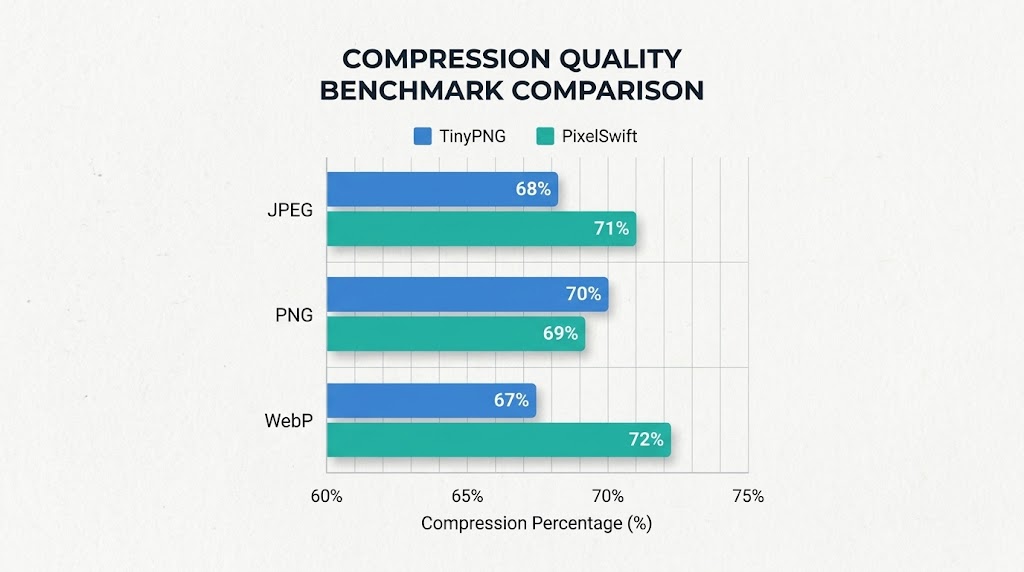
The difference in compression ratio is marginal — typically just 2-3%. But PixelSwift also offers format conversion. Converting PNG to WebP often yields better results than compressing PNG directly.
Who Needs PixelSwift Most?
1. E-Commerce Sellers
Processing hundreds of product photos weekly, needing fast compression and uniform sizing. PixelSwift's batch processing handles up to 100 images at once, and the built-in resizer standardizes dimensions for Amazon, eBay, Shopify, and other platforms.
2. Designers and Marketers
Handling large volumes of assets daily — TinyPNG's 500/month limit simply isn't enough. PixelSwift has no limits whatsoever.
3. Bloggers and Content Creators
Blog images need compression to speed up page loading. PixelSwift works instantly — no sign-up, just compress and download.
4. Developers
Don't want to pay for an image compression API? PixelSwift is completely free, fast, and supports modern formats like WebP and AVIF.
How Fast Is It?
On a typical modern computer:
- 1 MB JPEG: under 1 second
- 5 MB PNG: about 1 second
- 10 MB batch (5 images): about 2-3 seconds
Compare that to TinyPNG, where the same batch might take 15-30 seconds — and that depends on your internet speed. On slower connections, the wait gets even longer.
Switching from TinyPNG to PixelSwift
The switch is effortless:
- Open PixelSwift's compressor — works in any browser.
- Drag and drop your images — same workflow as TinyPNG.
- Adjust quality with the slider if needed.
- Download your compressed files instantly.
No account to create, nothing to install, zero learning curve. Works on both desktop and mobile.
Conclusion
TinyPNG is a great tool, but its free tier is too restrictive. If you need an image compressor that's truly free, with no usage limits, plus format conversion and resizing built in, PixelSwift is the better choice.
Unlimited. No sign-up. No cost — that's what an image compressor should be.
Ready to give it a try? Compress your first image with PixelSwift →
Want faster images?
Free online image compression — no signup, no upload limits.
Compress Now